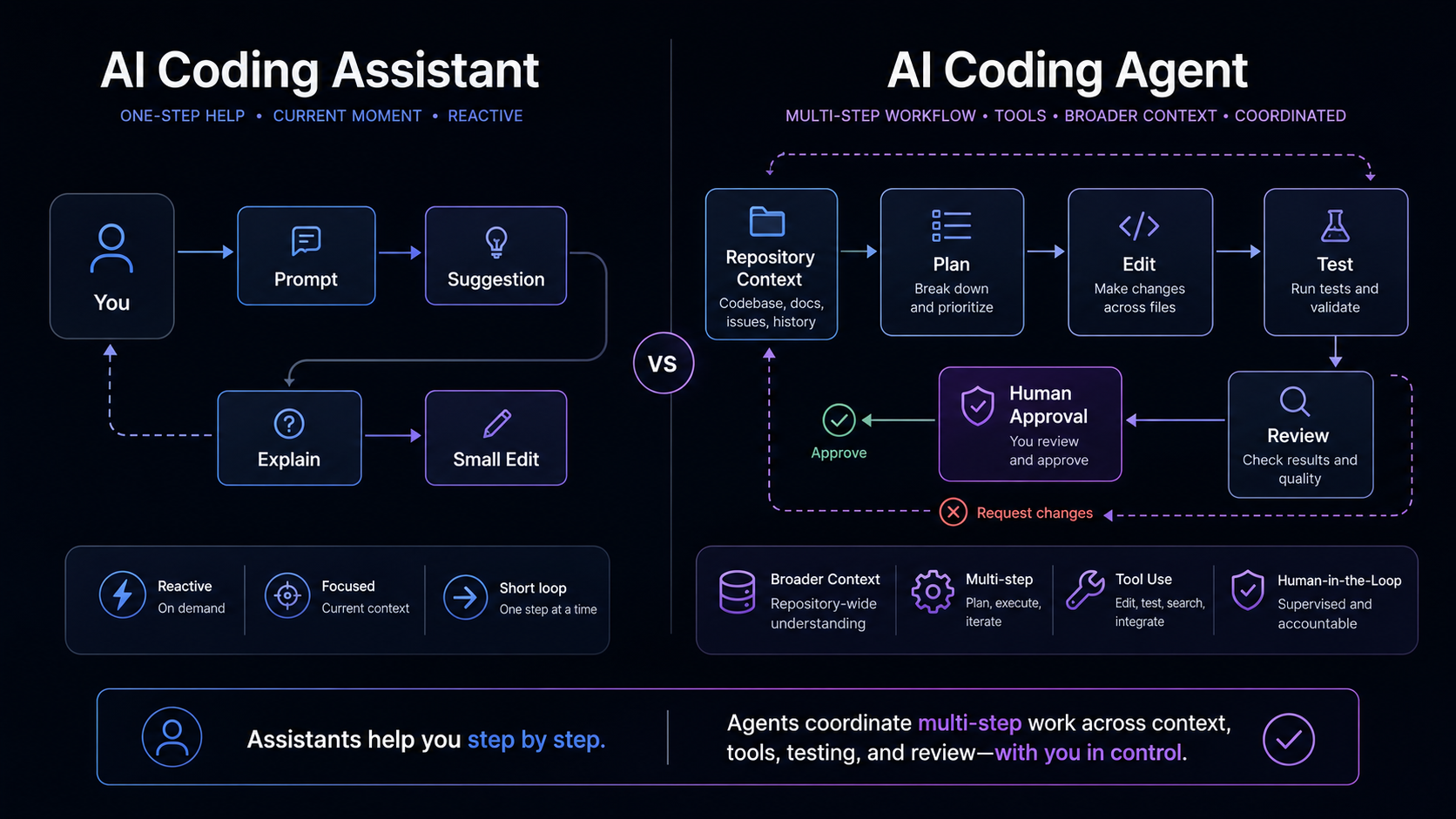
Modern AI coding tools use overlapping language. One product may offer autocomplete, chat, inline editing, agent mode, terminal access, and cloud-based task delegation. Another may use different labels for similar behavior.
For developers and teams, the useful question is not which label sounds more advanced. It is what workflow the tool supports: suggesting code, answering questions, inspecting files, editing a workspace, running commands, or preparing work for review.
This article compares autocomplete, chat-based coding assistants, AI coding assistants, AI coding agents, and delegated agent workflows as practical workflow patterns. It does not rank tools, compare prices, cite benchmarks, or claim that agents replace developers. For a deeper foundation, start with Synrese’s practical guide to what AI coding agents are.
Short answer: assistants are the broader category
“AI coding assistant” is the broadest practical term. It can describe AI features that help developers write, understand, edit, review, or reason about code. Depending on the product, that category may include autocomplete, chat-based help, inline edits, agent-like modes, or delegated repository workflows.
“AI coding agent” is narrower, but still not a universal industry standard. It is best understood as a workflow pattern: a tool or mode that can take a bounded task, inspect relevant context, sequence steps, use available tools where supported, propose or make changes where supported, and return work for human review.
The boundary depends on the product, environment, permissions, and team process. A chat interface can include agentic behavior. An agent can still require frequent approval. A delegated cloud workflow can differ from an editor-based agent mode. These categories overlap, but the workflow differences matter.
A simple way to frame it is this:
- Autocomplete helps while the developer is typing.
- Chat-based coding assistants help the developer ask, reason, explain, debug, and draft.
- AI coding agents can support a bounded task sequence when given context, tools, permissions, and review gates.
- Agent mode and delegated workflows are product-specific ways of packaging more agentic behavior.
None of these patterns removes developer responsibility. The human still owns the design decision, code review, test interpretation, merge decision, and deployment judgment.
Autocomplete: inline help inside the writing flow
Autocomplete is the most familiar form of AI coding assistance. It suggests code inline while the developer is already writing. The suggestion may complete a line, fill in a function, draft boilerplate, continue a pattern, or help with familiar syntax.
The key characteristic is interaction style. Autocomplete usually works inside the immediate editing flow. The developer is already in a file and moving in a direction; the tool offers a suggestion that can be accepted, edited, or ignored.
That makes autocomplete useful for local, well-understood work: writing a test case, repeating a familiar pattern, building a small helper function, or filling in structured code that follows nearby examples. If the developer understands the task and only wants help with the mechanics of writing, an inline suggestion can be more appropriate than assigning a multi-step task to an agent.
But autocomplete by itself does not usually define an agentic workflow. It does not normally investigate a repository, form a plan, run validation commands, prepare review notes, or manage a task sequence. It helps during writing. The developer remains the direct driver.
Chat-based coding assistants: conversational support for reasoning and drafting
Chat-based coding assistants add a conversational workflow. They let the developer ask questions, request explanations, explore errors, compare implementation options, or ask for review suggestions.
A developer might ask a chat assistant to explain an unfamiliar module, summarize a failing test, draft a small snippet, compare two approaches, or identify likely causes of an error. Depending on configuration, the assistant may use pasted code, selected code, open files, workspace context, or other available context. The developer still asks, clarifies, narrows the problem, decides which suggestions to apply, and verifies the result.
Chat can also produce code. That does not automatically make it an agent. A chat assistant can draft an implementation idea without owning the workflow around that implementation. If the developer copies a snippet into the codebase, the developer is responsible for adapting, testing, and reviewing it.
The safest way to use chat is to treat it as reasoning support, not a source of unquestioned truth. Ask what assumptions the answer makes, then compare the suggestion against the repository, documentation, tests, and team conventions.
AI coding assistants: the umbrella category
Because the market uses “assistant” broadly, it is helpful to treat AI coding assistants as an umbrella category rather than a single workflow. An assistant may appear as autocomplete, chat, inline editing, code explanation, test generation, commit help, review suggestions, or more agentic task support.
This is why direct comparisons can become confusing. “Assistant vs agent” is not always a comparison between two separate products. It may be a comparison between two modes inside one product, or between two ways of using the same tool. A modern coding assistant may provide autocomplete in one moment, chat in another, and agent-like workspace changes in another. The product label alone is not enough.
For teams, the better questions are operational:
- What context can the tool access?
- Can it modify files directly, or only suggest changes?
- Can it run commands, tests, or scripts?
- Does it produce a response, a diff, a branch, review notes, or a pull request?
- What approval gates exist before changes are accepted?
Those questions are more durable than product labels. They also help teams discuss risk without turning the conversation into hype or fear.
AI coding agents: task-oriented support with context, tools, and reviewable output
AI coding agents are more workflow-oriented than autocomplete or one-off chat. In Synrese’s framing, an AI coding agent is a workflow participant: a tool or mode that can help move a bounded software task through several steps, while keeping the final decision in human hands.
Where supported, an agent may inspect files, search a repository, reason through a task, propose a plan, edit files, run checks, summarize command output, or prepare a reviewable diff. The workflow may happen in an editor, terminal, or delegated cloud environment.
The point is not that agents are universally autonomous. They are not. The point is that the interaction shifts from a single suggestion or answer toward a task sequence.
That shift changes the human role. The developer now needs to define the task, constrain the scope, decide what the tool may access, review what changed, evaluate validation results, and decide whether the work should move forward.
A bounded agent task might look like this:
- Investigate why a specific test fails.
- Identify the likely cause.
- Propose the smallest change.
- Avoid auth, billing, migrations, and dependency updates.
- Run only the relevant local test command if approved.
- Return a summary, diff, and remaining uncertainties.
That is very different from “fix the codebase.” The more agentic the workflow, the more important the task boundary becomes.
Agent mode and delegated workflows are product-specific
“Agent mode” is not a universal definition. It is usually a product-specific way to package more agentic behavior inside a tool. In an editor, it may combine chat, workspace context, tool use, proposed file edits, and command suggestions. In a delegated cloud workflow, where supported, a task may be assigned to a system that works separately and returns a branch, diff, notes, pull request, or other review package.
These differences matter because the review model changes. In an editor workflow, the developer may stay close to every file edit. In a delegated workflow, the developer may review a larger package of work after the assigned task is complete.
None of these workflows should be treated as automatic approval. A branch, diff, pull request draft, or test summary is still a proposal. The team still needs to decide whether the work is correct, safe, maintainable, and aligned with the system.
It is also important not to overgeneralize from one product. File editing, command execution, pull request support, and approval behavior vary by tool and should be checked against current official documentation before adoption decisions.
Comparison table: how the workflows differ in practice
The table below is a mental model, not a ranking.
| Dimension | Autocomplete | Chat-based coding assistant | AI coding agent | Agent mode / delegated workflow |
|---|---|---|---|---|
| Typical interaction | Inline suggestion while typing | Conversation or prompt-response | Task-oriented sequence | Product-specific mode or assigned repository task |
| Typical context | Current file, cursor, nearby code, depending on tool | Pasted context, selected code, open files, or workspace context depending on tool | Repository, workspace, task, files, tools, or command context where supported | IDE workspace or cloud repository context, depending on product |
| Main output | Code completion or suggestion | Explanation, snippet, implementation idea, review suggestion | Plan, diff, file edits, test suggestions, command output, or summary where supported | Workspace changes, branch, pull request, review package, or task summary where supported |
| Human role | Accept, reject, edit suggestion | Ask, clarify, apply, verify | Scope the task, review plan and diff, approve commands, test, decide | Assign, review, iterate, merge, reject, or close the work depending on workflow |
| Risk profile | Usually narrower, but still requires review | Risk grows when context or suggestions are applied without verification | Higher when the tool can edit files, run commands, or touch several areas | Higher when delegated, cloud-based, repository-wide, or asynchronous |
| Useful task shape | Boilerplate, known patterns, local completions | Understanding code, debugging questions, alternatives, quick drafts | Bounded multi-step tasks, tests, small fixes, repository investigation | Tasks that benefit from a separate reviewable branch, diff, or work package |
The columns should not be read as a maturity ladder. Autocomplete is not obsolete. Chat is not inferior to agents. Agents are not automatically better for every task. The right workflow depends on scope, context, risk, and reviewability.
How to choose the right workflow for a task
Use autocomplete when the task is local and already understood: boilerplate, familiar syntax, repeated patterns, and small helper logic.
Use chat when the task needs explanation or thinking support: unfamiliar code, errors, implementation options, small snippets, or edge cases.
Use an agent when the task is bounded, multi-step, and reviewable: a small bug investigation, limited refactor, documentation update, test suggestion, or repository search that should produce a plan or diff. Include constraints, acceptance criteria, systems to avoid, and validation expectations.
Use a delegated workflow when a separate review package is useful and the task can be assigned clearly. The output may be a branch, diff, notes, pull request, or other review package where supported.
A practical rule is: the broader the task, the clearer the boundary should be. If the request touches security-sensitive code, dependencies, migrations, deployment configuration, or production-like systems, the permission boundary should become narrower, not looser.
What changes when a tool becomes more agentic
As a tool becomes more agentic, it may gain more context, more ability to act, or more responsibility for sequencing steps. That can make the workflow more useful, but it also changes the review burden.
More context can improve relevance, but it raises questions about data exposure, secrets, private code, and whether the tool sees enough of the system to reason correctly. Repository access is not the same as engineering judgment.
File editing makes diff review essential: what changed, why it changed, whether unrelated files were touched, and whether the result follows project conventions.
Command execution requires permission boundaries. Tests, linters, package managers, migrations, scripts, file operations, and deployment commands do not carry the same level of risk. Teams should define what is allowed, what requires approval, and what should stay human-operated.
Delegated or cloud-based workflows add review questions around repository visibility, branches, merge rights, secrets, rollback, and ownership. The practical principle is simple: the more a tool can see, change, or run, the more explicit the review process should become.
Common misconceptions to avoid
Misconception: agents replace developers
Agents can support parts of a development workflow. They do not remove the need for humans to define goals, judge architecture, review security, interpret tests, approve merges, or decide what should ship.
Misconception: agents are always better than assistants
“Better” depends on the task. Autocomplete may be right for local typing. Chat may be right for explanation and reasoning. An agent may be useful for bounded multi-step work. The question is which workflow fits the work.
Misconception: chat cannot be agentic, and agents are always autonomous
Some tools blend chat, edit, and agent behavior. A chat interface may call tools or propose file changes. An agent may still pause for approval, ask clarifying questions, or return a plan instead of editing directly. “Agentic” describes workflow behavior; it is not a guarantee of independence.
Misconception: if tests pass, the result is production-ready
Passing tests are useful, but they are not a complete review. Tests may be incomplete, generated tests may encode the wrong expectation, and a change can pass local checks while still missing security, edge-case, or product requirements.
Human review should scale with tool capability
Human review is not a final formality. For more agentic coding workflows, reviewers should ask:
- Is the task scope clear?
- What files changed?
- What assumptions did the tool make?
- Were commands run, and were they appropriate?
- Are the tests meaningful, or do they only confirm the tool’s chosen path?
- Did the change touch authentication, payments, privacy, infrastructure, migrations, dependencies, or security-sensitive logic?
- Does the diff include unrelated changes?
- Can the work be rolled back?
- Does a human understand why the change is correct?
This is ordinary engineering discipline applied to a new workflow. The tool can help produce work, but the team owns the result.
Conclusion: choose the workflow pattern, not the label
AI coding assistants are the broader category. Autocomplete, chat-based assistants, AI coding agents, and delegated workflows are practical patterns inside that broader space.
Autocomplete helps in the writing flow. Chat helps with explanation, reasoning, drafting, and debugging support. Agents can help with bounded task sequences when they have the right context, tools, permissions, and review gates. Delegated workflows can package work for review in a branch, diff, notes, or pull request draft where supported.
The categories overlap because modern tools blend them. That is why teams should focus less on labels and more on operational questions: what can the tool access, what can it change, what can it run, what does it return, and how will a human review the result?
Start with Synrese’s practical guide to AI coding agents if you want the broader workflow foundation before comparing tools. Future Synrese comparisons can build on that foundation without turning tool selection into a ranking.
The best starting point is not to ask whether an agent is more powerful than an assistant. It is to ask which workflow gives developers useful help while keeping the final engineering decision in human hands.