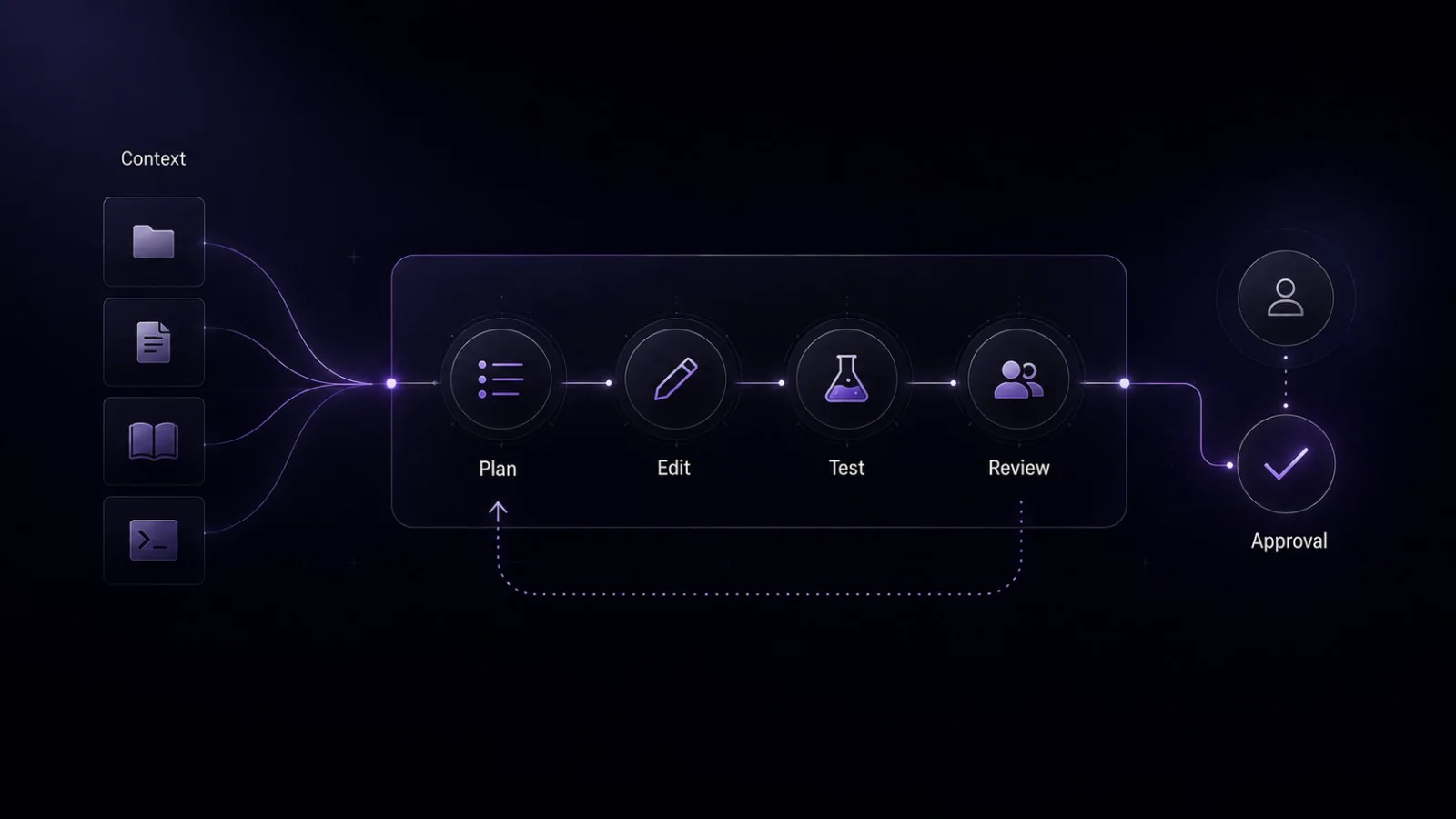
AI coding agents are increasingly visible across developer tooling, but the term is still used inconsistently. In some products, an agent is a mode inside an editor. In others, it is a command-line tool, a cloud workflow, or a delegated assistant that can prepare a branch for review.
That variation matters. A team that treats every agent as an autonomous engineer will create unnecessary risk. A team that treats agents as carefully constrained workflow participants may find useful support for investigation, drafting, testing, and review.
This guide gives a practical definition of AI coding agents, explains how they differ from autocomplete and chat-based assistants, and outlines where they can fit into real software workflows. It does not rank tools, compare pricing, or claim that agents replace developers. The point is simpler: understand the workflow pattern before granting a tool access to your repository, terminal, or pull request process.
Introduction: AI coding agents are useful, but not magic engineers
An AI coding agent can help move a software task through parts of the development process. Depending on the product and configuration, it may inspect project files, reason through a task, propose a plan, edit code, run commands or tests, and summarize the result for a human reviewer.
That does not make it a replacement for engineering judgment.
Developers and teams still own the important decisions: what should be built, whether the implementation fits the system, whether the change is secure, whether tests are meaningful, whether a pull request should be merged, and whether anything should be deployed.
A useful way to read the category is this:
AI coding agents are not magic engineers. They are software tools that can participate in a coding workflow when their context, permissions, and review gates are defined clearly.
What is an AI coding agent?
A useful working definition is:
An AI coding agent is an AI-assisted development tool that can use codebase context and available tools to work through multi-step software tasks, such as investigating code, proposing or editing changes, running commands or tests where supported, and preparing work for human review.
This is a practical definition, not a universal industry standard. The boundary changes by product, environment, permissions, and organization policy. Some agents work inside an IDE. Some run in a terminal. Some operate in a cloud workflow. Some can edit files directly. Some only suggest changes. Some can run commands, while others require a human to run validation manually.
The important distinction is the workflow pattern, not the label on the product page.
A coding agent usually goes beyond a single answer. It can take a task, gather or use project context, sequence steps, produce implementation artifacts, and return work that needs review. In a repository, that might mean investigation notes, a plan, a diff, tests, terminal output, or a pull request summary.
For teams, the safest definition is also the most operational: an AI coding agent is a workflow participant. It can support parts of the process, but it does not remove the need for human ownership.
AI coding agents vs AI coding assistants vs autocomplete
AI coding tools often overlap. A single product may include autocomplete, chat, and agent-like behavior. Still, the categories are useful because they describe different levels of workflow involvement.
Autocomplete
Autocomplete predicts code inline as a developer types. It is usually fast, local to the current editing flow, and useful for completing functions, boilerplate, repetitive patterns, or familiar syntax.
Autocomplete can be valuable, but it usually does not own a multi-step task by itself. It does not normally investigate an issue across a repository, form a plan, run tests, or prepare a review package. It helps inside the moment of writing code.
Chat-based coding assistants
A chat-based coding assistant answers questions, explains code, drafts snippets, and helps reason about implementation choices. It may use pasted context, selected files, workspace context, or connected project information depending on the tool.
Chat assistants are often useful for understanding unfamiliar code, comparing implementation options, explaining errors, or asking for review suggestions. The interaction is usually conversational: the developer asks, the assistant responds, and the developer decides what to do next.
AI coding agents
An AI coding agent is more workflow-oriented. It may sequence steps, inspect relevant files, use tools, modify files where supported, run validation commands where supported, and produce a result for review.
That does not mean agents are always better than autocomplete or chat. They are different tools for different task shapes.
Autocomplete is useful when the developer knows what they are writing and wants speed. Chat is useful when the developer wants explanation or reasoning support. Agents can be a better fit when the task has multiple steps, touches several files, and benefits from a structured plan, diff, or validation trail.
The boundary is not sharp. Modern developer tools increasingly blend these modes. A cautious team should ask what the tool can actually access, what it can change, what it can run, and how the human review process works.
What can AI coding agents commonly help with?
AI coding agents are best discussed by task category, not by guaranteed outcome. Capabilities vary, and even a supported task still needs review.
Commonly useful areas include:
- Investigating a bug or failing test.
- Explaining an unfamiliar part of a repository.
- Drafting a small implementation change.
- Generating or updating tests.
- Refactoring a limited area of code.
- Updating documentation or comments.
- Preparing a proposed diff for review.
- Summarizing project structure or dependency relationships.
- Drafting pull request notes or implementation summaries where the workflow supports it.
These are support tasks, not proof of correctness. An agent may help find a likely cause of a bug, but the developer still needs to verify the diagnosis. It may draft tests, but those tests can encode the wrong behavior if the original task was misunderstood. It may propose a refactor, but the team must decide whether the result fits the architecture.
Agents tend to be easier to evaluate when the task is specific, bounded, and reviewable. “Investigate why this test fails and propose the smallest fix” is safer than “clean up the whole codebase.” “Update this documentation page to match these verified commands” is safer than “rewrite all developer docs.”
What an agentic coding workflow looks like
A practical agentic workflow is not just “ask AI to code.” It is a sequence of scoped steps with human review built in.
1. The developer gives a bounded task
The task should describe the issue, repository area, expected behavior, constraints, and non-goals. A good task gives the agent enough context to work without granting unlimited permission.
A strong request might include:
- the bug or feature being considered;
- the files, modules, or routes that are likely relevant;
- the expected output;
- tests or checks that should be run;
- files or systems the agent should avoid;
- whether the agent should plan before editing;
- whether dependency changes, migrations, or shell commands need approval.
Prompting an agent is closer to writing a task specification than asking a casual question. The more precise the task, the easier it is to review the result.
2. The agent inspects context
Depending on the tool, the agent may search files, read code, inspect documentation, look at errors, or use repository context. Context quality matters. If the agent sees only part of the system, it may make confident assumptions that are wrong.
Repository context is not the same as full engineering context. Business rules, product constraints, team conventions, and architectural history may not be visible in code. Human reviewers still need to supply that judgment.
3. The agent plans or sequences work
Some tools expose a plan before editing. Others work more implicitly. For larger changes, a plan is useful because it gives the developer a chance to catch misunderstanding before files are modified.
A good plan should be specific enough to review. It should name likely files, describe intended changes, call out validation steps, and mention uncertainty. If the plan is vague, the task is probably too broad.
4. The agent proposes or edits changes
The output may be a written recommendation, a diff, modified files, a branch, a pull request draft, test changes, or implementation notes. The format depends on the product and setup.
This is where human review becomes central. Reviewers should inspect what changed, why it changed, and whether the change affects unintended areas. A clean-looking diff can still be wrong if it solves the wrong problem, misses edge cases, weakens security, or ignores project conventions.
5. The agent may run commands or tests where supported
Some agent workflows can run terminal commands, tests, linters, or other workspace tools. This can be useful, but it is also a point of risk.
Running tests does not prove a change is correct. Tests may be incomplete. New tests may validate the wrong behavior. Commands can also have side effects, especially when they involve migrations, package installation, file deletion, scripts, external services, or production-like environments.
Teams should define approval rules for commands. Low-risk read-only commands may be acceptable in some workflows. Dependency changes, migrations, deployment commands, auth-related operations, and destructive shell commands should receive stricter review.
6. The human reviews, tests, and decides
The developer or team remains responsible for the final decision. The agent can help produce reviewable work, but humans accept, reject, revise, merge, or deploy it.
A healthy workflow keeps review visible:
- inspect the diff;
- run relevant checks;
- review security-sensitive areas;
- confirm the change fits the design;
- verify no unrelated files were touched;
- decide whether the work is ready for merge.
The strongest use of agents is not skipping the development process. It is making parts of the process easier to inspect and iterate on.
Examples of documented agent capabilities, without ranking tools
The following examples are included only to illustrate different documented surfaces. This is not a ranking, recommendation list, pricing guide, or complete market map. Product capabilities change, and final publication should re-check official documentation.
| Example tool or mode | Surface | Documented capability to mention cautiously | Editorial caution |
|---|---|---|---|
| Claude Code | Terminal, IDE, app, or browser surfaces described in Anthropic documentation | Anthropic describes Claude Code as an agentic coding tool that can read codebases, edit files, run commands, and integrate with development tools. | Do not assume every surface, plan, or configuration behaves identically. |
| OpenAI Codex CLI | Local terminal workflow | The official repository describes Codex CLI as a coding agent from OpenAI that runs locally in the terminal. | Avoid claims about pricing, model access, or editor integrations without fresh verification. |
| GitHub Copilot coding agent | Cloud/delegated GitHub workflow | GitHub documentation describes a workflow where Copilot can research a repository, create an implementation plan, make changes on a branch, support review and iteration, and help create a pull request when ready. | Avoid plan availability claims and avoid implying broad production autonomy. |
| VS Code Copilot agent mode | Editor workflow | VS Code documentation describes agent mode as a workflow where the agent can determine needed context, make workspace changes, and may run terminal commands, while the developer reviews suggested changes. | Treat this as product-specific behavior, not a universal agent definition. |
| aider | CLI/chat with selected files | aider documentation describes adding source files to a chat session so it can see contents and edit those files. | Use as an example of repository-aware coding assistance, not as a general statement about all agents. |
A table like this should stay narrow. It should not include “best for” labels, scores, affiliate recommendations, pricing, benchmark results, or broad claims about quality.
What inputs does an AI coding agent need?
An agent can only work with the task, context, tools, and permissions it receives. Better inputs do not guarantee correct output, but they reduce ambiguity and make review easier.
Useful inputs include:
- a clear task description;
- the relevant repository area;
- expected behavior or acceptance criteria;
- constraints and non-goals;
- coding standards and project conventions;
- tests or validation steps;
- files, commands, or systems to avoid;
- security or privacy boundaries;
- the expected output format.
For example, instead of asking an agent to “fix the login flow,” a team might ask it to “investigate why the password reset route returns a 500 error in development, summarize the likely cause, propose a minimal change, and do not edit authentication middleware without approval.”
The second request is easier to audit. It limits scope, states the expected output, and defines a boundary around sensitive code.
What outputs should teams expect?
AI coding agents may produce several kinds of output:
- investigation notes;
- implementation plans;
- code diffs or file edits;
- test additions or updates;
- terminal output or check results where supported;
- pull request summaries;
- review notes;
- questions or uncertainty flags.
Good outputs are reviewable and traceable. They should make it clear what changed, why it changed, and how the change was validated.
Teams should be cautious with outputs that are hard to inspect. A large unexplained diff, a broad dependency update, or a vague “all tests pass” summary is not enough. The more powerful the agent, the more important the review trail becomes.
Where AI coding agents are useful
AI coding agents are easiest to evaluate on bounded, reversible, reviewable tasks with clear context and measurable validation.
Good early use cases include:
- documentation updates;
- small bug investigations;
- test generation for existing behavior;
- limited refactors in a known area;
- code explanation and onboarding support;
- drafting implementation options;
- preparing a proposed change for review.
Usefulness depends on the repository and the team. In practice, clear structure, meaningful tests, documented conventions, and careful review practices can make an agent’s output easier to evaluate. Weak tests, hidden business rules, and unclear ownership make review harder.
This is why Synrese treats agents as workflow tools rather than productivity shortcuts. The question is not “can the agent write code?” The better question is “can the team review, test, and safely decide what to do with the agent’s output?”
Where teams should be cautious
Agentic workflows become riskier when tools can make changes across important systems or run commands with side effects.
Teams should apply stricter review to:
- authentication and authorization;
- payments and billing;
- data privacy and compliance-sensitive code;
- infrastructure and deployment configuration;
- database migrations;
- dependency updates and package installation;
- security-sensitive parsing, permissions, or sandbox boundaries;
- commands that delete, overwrite, deploy, migrate, or expose data.
Agents can still help in these areas, especially for analysis, explanation, test suggestions, or review checklists. But changes should remain under human control. The higher the risk, the narrower the permission boundary should be.
Main risks and limitations
AI coding agents inherit many of the familiar limitations of language models, with additional risk when they can edit files or use tools.
Hallucinated assumptions
An agent may infer project behavior that is not true. It may assume a function is unused, a test covers a case it does not cover, or a dependency behaves in a way that does not match the actual version.
Reviewers should ask: what evidence in the repository supports this change?
Insecure or fragile code
Generated code can look reasonable while missing validation, access control, error handling, edge cases, or threat-model considerations. Security-sensitive changes need extra scrutiny, especially when they touch authentication, permissions, user input, secrets, or data boundaries.
Unsafe commands or dependency changes
Tool use increases both power and risk. A command that looks routine may modify lockfiles, install packages, run migrations, delete generated files, or call external services.
Teams should define which commands agents may run automatically, which require approval, and which are never allowed without a human operator.
Incomplete tests
Passing tests are useful, but they are not a guarantee. The test suite may be incomplete. New tests may encode the wrong behavior. An agent may also focus on making a failing test pass without understanding the broader product expectation.
Review should include whether the tests are meaningful, not just whether they pass.
Context loss
Agents may miss architectural intent, product constraints, customer expectations, compliance requirements, or team conventions. Even with repository access, the agent may not understand why the system is shaped a certain way.
This is one reason plans and summaries matter. They reveal assumptions before those assumptions become accepted changes.
Over-automation
A major practical risk is not only that an agent makes a bad suggestion. It is that the workflow can feel smooth enough that people accept changes too quickly.
Human ownership should stay explicit. Someone should know what changed, why it changed, what was checked, and what remains uncertain.
A practical adoption checklist for teams
Before using AI coding agents in a real repository, teams should define a simple operating model.
Use this checklist as a starting point:
- Start with low-risk, bounded tasks.
- Define what the agent may and may not change.
- Require a plan before broad or multi-file edits.
- Keep dependency changes, migrations, shell scripts, auth, payments, and security-sensitive code under stricter review.
- Review every diff before merge.
- Run relevant tests and inspect failures manually.
- Treat generated tests as code that also needs review.
- Keep humans responsible for design decisions, code ownership, merge approval, and deployment.
- Document team conventions so the agent receives better context.
- Track what worked and what failed without turning early anecdotes into productivity claims.
The goal is not to block experimentation. It is to make experimentation safe enough to learn from.
How to think about AI coding agents over time
AI coding agents will keep changing. Tool surfaces, permissions, model behavior, repository indexing, pull request workflows, and policy controls can change over time, sometimes quickly.
That makes evergreen evaluation more useful than memorizing current feature lists.
When evaluating a coding agent, ask:
- What context can it access?
- What tools can it use?
- What permissions does it need?
- What changes can it make without approval?
- How does it show its work?
- How do humans review, test, and roll back changes?
- What security, privacy, and data-handling controls apply?
- What happens when the agent is uncertain?
- Can the team constrain it to a specific task, folder, branch, or command set?
These questions are more durable than a pricing table or launch announcement. They help teams compare workflows without turning the article into a ranking.
Source notes for review
This draft uses the research brief’s verified source set as a starting point. Before publication, re-check the official pages and confirm that product names, terminology, and capabilities are still current.
Primary source set for fact-check:
- Anthropic Claude Code overview: https://docs.anthropic.com/en/docs/claude-code/overview
- OpenAI Codex CLI repository: https://github.com/openai/codex
- GitHub Copilot coding agent documentation: https://docs.github.com/en/copilot/using-github-copilot/coding-agent/about-assigning-tasks-to-copilot
- VS Code Copilot agent mode documentation: https://code.visualstudio.com/docs/copilot/chat/chat-agent-mode
- aider documentation: https://aider.chat/docs/usage.html
- MITRE CWE-1426: https://cwe.mitre.org/data/definitions/1426.html
OWASP GenAI Security Project / LLM Top 10 is also relevant for security framing: https://owasp.org/www-project-top-10-for-large-language-model-applications/
Conclusion: keep agents useful by keeping review central
AI coding agents are best understood as practical workflow participants. They can help investigate code, sequence tasks, draft changes, run validation where supported, and prepare work for review. They are not autonomous replacements for developers, and they do not remove the need for engineering judgment.
The safest way to adopt them is to begin with narrow, reversible tasks; define clear permission boundaries; ask for reviewable outputs; and keep humans responsible for design, security, merge, and deployment decisions.
Used carefully, agents can make parts of software development easier to inspect, test, and review. Used carelessly, they can turn uncertain assumptions into confident changes. The difference is not only the tool. It is the workflow around the tool.
The strongest use of AI coding agents is not replacing the development process; it is making parts of that process easier to inspect, test, and review.